Loomy
Recently, there are more and more desktop AI assistants, but there are not many products that can truly go from "answering questions" to "operating computers". Loomy launched by iFlytek takes the desktop AI Agent route. It is not simply to put a chat window in the computer, but to
Introduction
Recently, there are more and more desktop AI assistants, but there are not many products that can truly go from "answering questions" to "operating computers". Loomy launched by iFlytek takes the desktop AI Agent route.
It does not simply put a chat window in the computer, but hopes to take over some specific tasks: organizing files, searching for information, generating documents, analyzing forms, operating web pages, processing emails, and even remotely assign tasks to the computer through WeChat, QQ, Feishu and DingTalk.

1. Introduction to Loomy
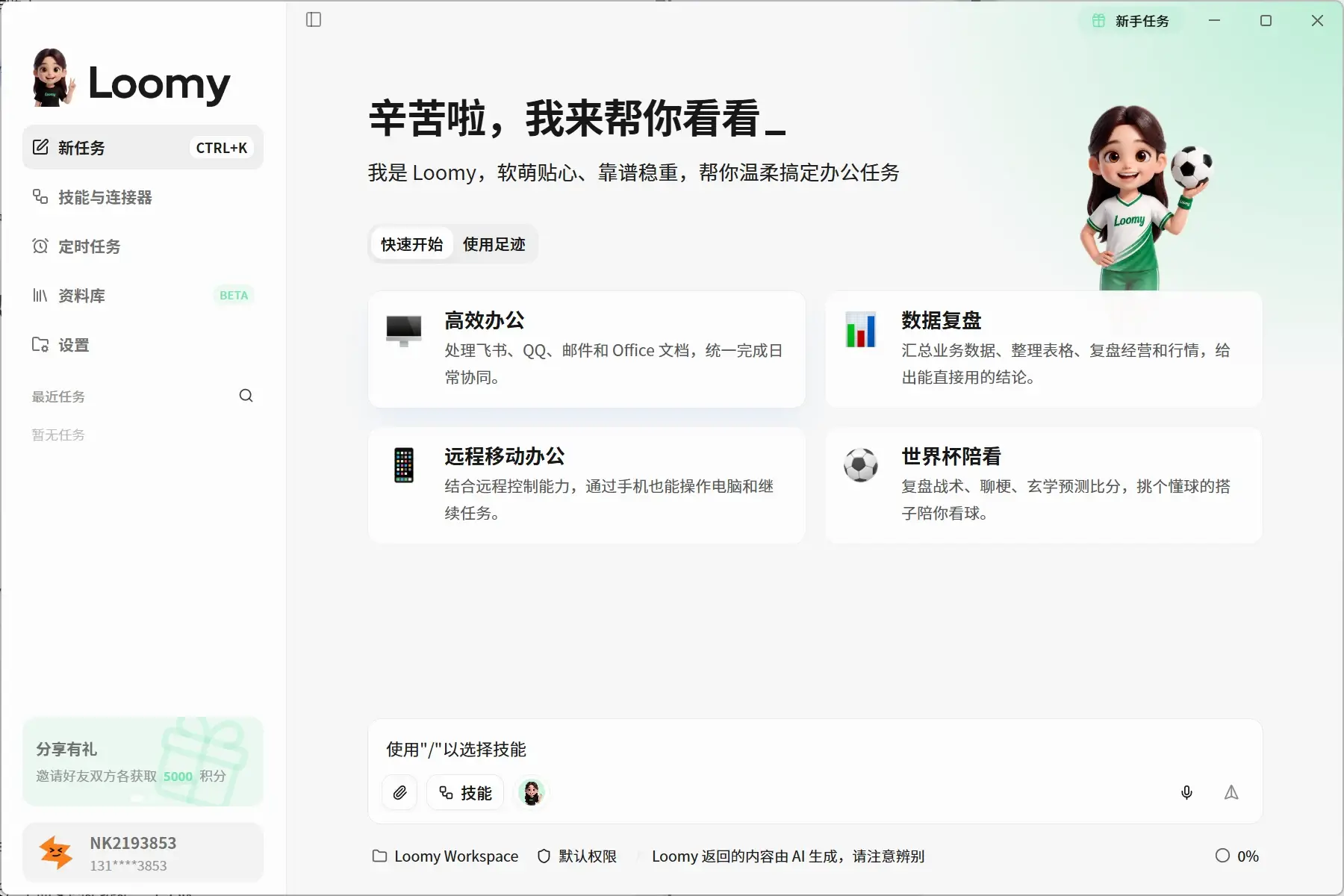
Loomy is a desktop AI assistant for office scenarios. Officially, it is called an “AI work companion.”
Compared with ordinary chatbots, it emphasizes task execution. You can directly tell it what to do in natural language, and it will try to split the steps, call tools, and save the results locally or send them to a designated platform.
For example, you can make it:
- Organize the data in the download folder
- Read the document and extract the key points
- Generate Word, Excel or PPT based on data
- Search the web and compile reports
- Check emails and organize to-dos
- Create calendar reminder
- Generate daily or weekly reports regularly
- Remotely control your computer on your mobile phone to complete tasks
Loomy currently supports x64 devices running Windows 10 and above, as well as macOS devices powered by Apple Silicon chips. The Windows installation version and the green version are still marked as Beta, and the installation path is best not to contain Chinese characters.
I prefer to understand it as a "desktop Agent that lowers the threshold for use." Unlike some open source Agent tools, which require you to install the operating environment, handle dependencies, and modify configuration files, you can experience it directly after downloading the client, which is obviously more suitable for ordinary users who don't want to fiddle with the command line.
2. Product functions
1. AI dialogue and task execution
The basic entrance of Loomy is still a chat box, but it not only generates text, but can also perform multi-step tasks.
For example, you can let it search for the latest information on a certain industry, organize it into a report, and then generate an email based on the report. The entire process does not require frequent copying and pasting, and is suitable for work that has relatively fixed steps but is time-consuming.
Compared with ordinary AI dialogue tools, this is also the most valuable part of Loomy: it does not simply tell you "what should be done", but tries to complete the thing as much as possible.
2. Local database
Loomy can scan local directories that users actively authorize and index documents, images, and applications. Then you don’t have to remember the file name, you just need to describe the general content of the file and let it help you search.
For example: Help me find the product data report made last month.
Scanning and indexing of the database is mainly done locally, and Loomy will not read unauthorized directories by default. Currently, this function is still in the beta stage. Intelligent image recognition will call the AI model and consume points according to the number of pictures.
This function is quite useful for people who have a lot of files on their computer and the names are random. However, when creating a large database for the first time, it is still worth paying attention to the indexing speed and resource usage.
3. Document, form and PPT processing
Loomy has built-in office skills such as Word documents, Excel tables, PPT production, and document writing.
It can read and edit common office files, complete formatting, formula calculation, chart production, content extraction and report generation. The Skills Plaza also provides skills in different directions such as Xiaohongshu content, stock analysis, and e-magazines.
In actual use, it is best to be more specific about the task. For example, don’t just say “Help me with the table,” but explain which columns need to be cleaned, what metrics to calculate, and what kind of charts to generate. The clearer the requirements, the easier it is for the output to meet expectations.
4. Free model switching
Loomy provides models such as MiniMax, Doubao, DeepSeek and Tongyi Qianwen by default, and also allows users to add their own model service provider API Key. The model configuration is saved locally and can be switched directly after saving without restarting the client.
This is more suitable for users who have purchased large model APIs. It can not only reduce the consumption of Loomy points, but also choose different models according to the task, without relying entirely on the default configuration of the platform.
5. Skills and MCP Tools
Loomy's skills can be understood as workflows prepared for different tasks. For example, Excel spreadsheet expert, Xiaohongshu card generator, email drafting assistant, etc.
Skills support three permissions:
- Allowed: AI can be called directly
- Inquiry: User confirmation is required before use
- Forbidden: The call is not allowed at all
In addition, the toolbox supports configuring MCP services to allow Loomy to connect browsers, mailboxes, system calendars, and other external tools. The official currently has built-in MCPs such as browsers, QQ mailboxes, and system calendars, and also allows users to add external MCPs through JSON.
It is recommended that skills related to operations such as sending emails and modifying files are set to "Ask". Although you have to click more to confirm each time, it is more secure than the AI performing the wrong operation on its own.
6. Remote control
After configuring WeChat, QQ, Feishu or DingTalk, you can send commands to Loomy on the computer through your mobile phone.
For example, when the person is outside, let him check the progress of the task, open a certain file, organize the information, or send back the processing results. The computer must be turned on and Loomy running in the background, otherwise the task cannot be performed.
This function is very imaginative, but when it comes to file modification, web page operations and message sending, it is not recommended to open too high permissions all at once. It would be more appropriate to start with low-risk operations such as querying task status and organizing data.
7. Scheduled tasks
Loomy supports scheduled execution of fixed processes, such as:
- Organize email digest every morning
- Generate weekly work report every Friday
- Collect industry information regularly
- Check project progress at fixed times
- Automatically generate content topics
Scheduled tasks require Loomy to continue running in the background. If the program is completely exited, the computer is hibernated, or permissions are incompletely configured, the task may not be triggered. It is best to execute complex processes successfully once manually and then set them as scheduled tasks.
8. AI partners and desktop pets
Loomy also added some companion-oriented designs. Users can create AI partners with different personalities and set their names, personalities, expressions and work styles.
The underlying tool capabilities of different partners are basically the same, with the main differences being the tone of response and collaboration methods. For example, "Xiao Lin" is more calm and structured, while "Xiao Nuan" is more suitable for creative expression and easy communication.
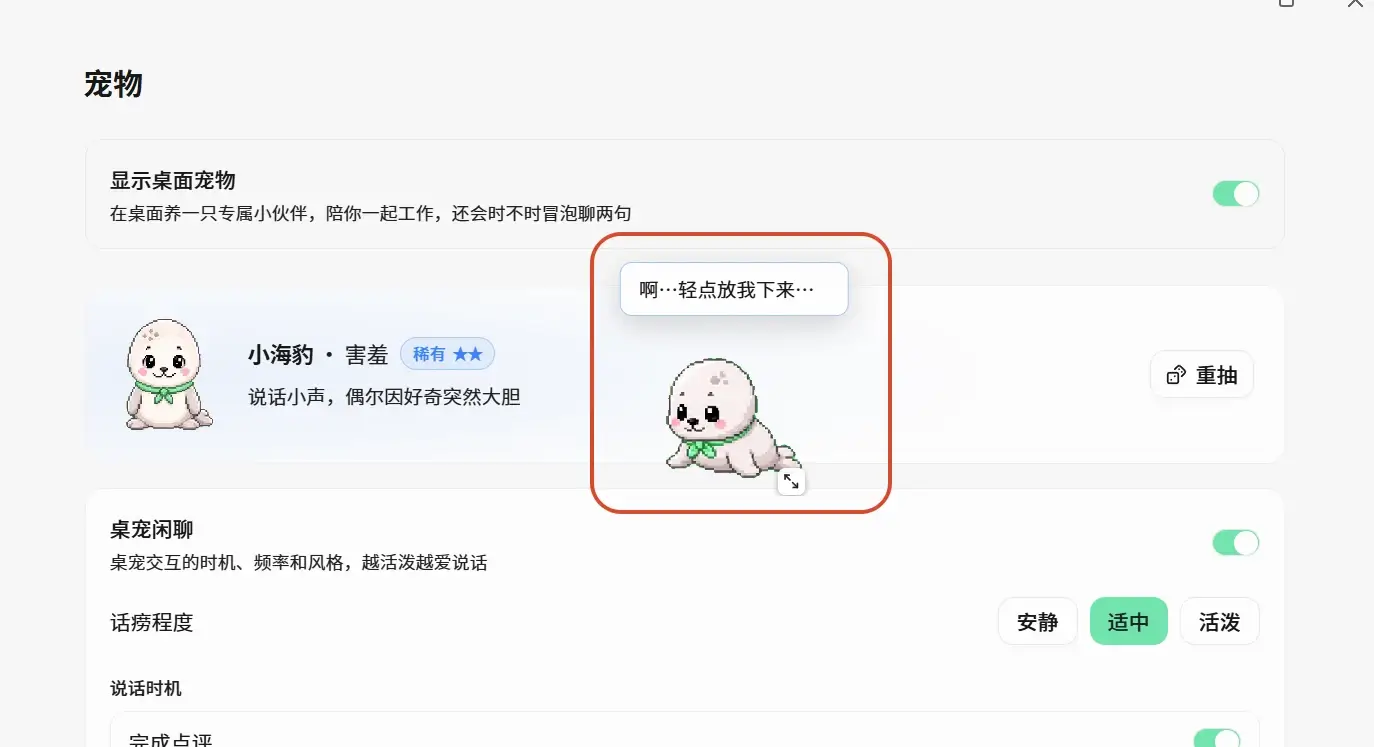
After the July 2026 update, Loomy launched desktop pets again. Desk pets will react based on task start, completion, error and idle status, and can also be dragged, clicked or adjusted to be active.
For those who pursue efficiency, this part is not strictly necessary; but it does make the product look less like traditional office software.
3. Product features
Ready to use out of the box, low installation threshold
The biggest advantage of Loomy is not how amazing individual capabilities are, but that it puts models, skills, files, browsers and office tools into the same client.
Ordinary users do not need to understand the concepts of Agent, MCP, and environment variables first, and can start experiencing it from basic dialogue and file organization.
Well adapted to domestic office environment
Loomy has made many adaptations to WeChat, QQ, Feishu, DingTalk, Enterprise WeChat and domestic email services.
For users who mainly use domestic office software, this experience is usually more convenient than Agent tools that copy overseas workflows.
File permissions are relatively clear
By default, Loomy can only access working directories that the user has explicitly authorized. Unauthorized directories require additional confirmation, and the model API Key configured by the user is only saved locally.
However, it should be noted that local indexing does not mean that all data will not leave the computer. When it comes to content understanding, summarization or analysis, relevant text may be sent to the large model service provider used. Therefore, company secrets, customer data and sensitive contracts are still not recommended to be handled directly by the default model.
4. Usage tutorial
Step 1: Download the client
Go to the Loomy official website, open the download page, and select the version according to your computer system.
- macOS: Currently only supports M series chips
- Windows: Supports Windows 10 and above x64 devices
- When Windows installation fails, you can try the green version
Windows users need to pay attention to avoid Chinese characters in the installation and decompression paths.
Step 2: Select the working directory
The first time you execute a file task, Loomy will ask you to choose a working directory.
It is recommended to create a special test folder first and put several insensitive Word, Excel, PDF and pictures in it. Do not initially authorize an entire hard drive or a directory containing important data.
Step 3: Choose a model
Enter "Settings - Model", you can directly use the platform default model, or you can add your own API Key.
It is easiest to use the default model when you first start to experience it; after you use it more frequently, you can consider connecting to your own model service.
Step 4: Install skills
Open "Skills and Connectors" or the Skill Square and select your commonly used abilities, for example:
- Word Document Expert
- Excel spreadsheet expert
- PPT production
- Email drafting
- Xiaohongshu content generation
- data analysis
For skills involving sending emails, deleting or modifying files, it is recommended to set the permissions to "Ask".
Step 5: Start with simple tasks
For first time use you can try:
Read the three documents in this folder, sort out common and different points of view, and generate a Markdown summary.
After confirming that file reading and content generation are normal, try web search, email processing, scheduled tasks or remote control.
5. Usage scenarios
Self-media operation
Loomy can assist with topic selection, data search, article draft, title optimization, content layout and data review.
It is more suitable to help creators reduce duplication of work, but it is not recommended to publish the generated content directly as it is. Especially opinions, cases and product experiences, you still need to add real information yourself.
Daily office
Processing meeting minutes, weekly reports, emails, Excel data and project documents is the scenario where Loomy is most suitable for product positioning.
Especially for tasks such as "first reading multiple files and then summarizing them into a report", the advantages of the desktop Agent can be better utilized than simply chatting.
Study and prepare lessons
You can ask Loomy to organize courseware, generate notes on knowledge points, create exercises, or build a personal learning library based on local materials.
The database is still in the Beta stage. It is best to go back to the original text to check important knowledge points, and do not rely entirely on AI summary.
E-commerce operations
E-commerce users can use it to generate product titles, organize selling points, write customer service replies, or filter order exception information.
不过自动回复客户和修改订单属于高风险操作,最好保留人工确认。
telecommute
出差或离开工位时,可以在手机上查询电脑任务状态、调取资料和执行轻量任务。
It is more suitable for "remotely arranging computer work" rather than completely replacing remote desktop software.
6. Price
The Loomy client is currently free to download, and new users will receive 5,000 points upon downloading. The official documentation states that 5,000 points can usually support about 50 common office tasks, but the specific consumption will be affected by the task length, context, number of model calls, and the number of external tools.
Using the default model will consume Loomy points; after configuring your own model API Key, the model call itself usually does not deduct Loomy points.
Points can be obtained through activities, friend invitations or recharge. The official website has not yet publicly listed the fixed points package price. The specific amount needs to be subject to the real-time display on the Loomy client recharge page.
Therefore, it is currently closer to the charging method of "free client + point consumption + support for self-prepared API" rather than the traditional fixed monthly membership fee.
7. Use evaluation
My overall impression of Loomy is that it is a desktop AI Agent with a clear direction and rapid improvement in completion.
What's really attractive about it is not that the chat answers are much smarter than other models, but that it strings together local files, office documents, browsers, mailboxes, calendars, skills and remote controls. For people who are not familiar with the command line and want to experience automated office work, it is indeed much easier than deploying the Agent yourself.