
BlackboxAI
A browser extension that utilizes real-time encoding for assistance.
Introduction
Browser extension for real-time coding assistance.
What is the BLACKBOX AI Extension – an AI add-on/plug-in for Chrome?
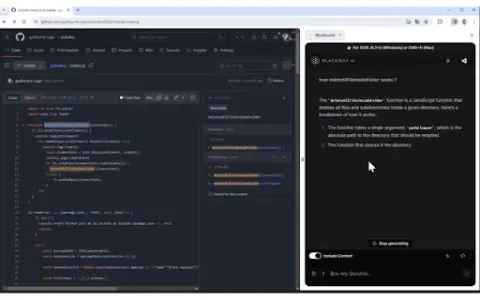
BLACKBOX AI Extension is a tool designed to enhance your coding workflow by providing real-time assistance with code-related questions and suggestions. It is seamlessly integrated into your browser and GitHub, offering features such as code chat, context-aware answers, and OCR (Image-to-Text) functionality.
How to use the BLACKBOX AI Extension for Chrome?
You can use the BLACKBOX AI extension via the browser icon, keyboard shortcuts, or directly within GitHub. Use Code Chat to get answers to common coding questions; enable the “Include Context” option to ask about issues related to the current page, and click the “Code Chat” button on GitHub to inquire about specific code repositories. The OCR function can be activated by pressing CTRL+E (on Windows) or CMD+E (on Mac).
The core functionality of the BLACKBOX AI extension for Chrome.
Code chatting feature assisted by real-time encoding
Answering Questions Based on Context Awareness
Specific code assistance integrated with GitHub
OCR (Image to Text) Function
Answering Questions Based on Context Awareness
Specific code assistance integrated with GitHub
OCR (Image to Text) Function
Visits:8
Updated:2026-11-06






1
 2
 3
 4
 5
 6
 7
 8
 9
 10

Tangle.io
Intelligent ERP software for the manufacturing industry, quickly deployed to meet unique needs.
GradeLab
An AI-powered grading and assessment platform for educators.
WorkWeave
An AI platform that enhances the performance of engineering teams and provides personalized insights.
Docsumo
Docsumo 自动从非结构化文档中提取数据,准确率高且效率高。
Aginsi AI
Aginsi is an AI research tool for collecting, summarizing, and organizing research.
Persuwise
基于AI的邮件教练,用于有效的外展和更快的积极回复。
Interview Coder
An AI-based tool for preparing for LeetCode interviews, offering real-time assistance with coding tasks.
VoiceInk
An open-source speech-to-text app for macOS that provides local AI to protect privacy and support offline use.
AI Product Tools
AI-based tool for generating descriptions, titles, and tags for e-commerce products.
Internet.io
A platform that integrates top-tier AI engines to provide reliable insights and enable the creation of customized agents.
1
 2
 3
 4
 5
 6
 7
 8
 9
 10

Zlibrary
Zlibrary is known as the world's largest digital library, containing 9,826,996 e-books and 84,837,646 journal articles. From various well-known literary works, science and engineering, humanities and arts, to academic papers, etc.! Support PDF, epu
LinkFox AI
为跨境电商提供的AI工具
HeyGen
AI数字人视频生成
DuiYou AI
Duiyou is a service platform developed by Alibaba Design to support designers throughout their entire career journey. It builds its capabilities around five key user values—quality, efficiency, skills, achievements, and income—to fully serve designers, with the goal of becoming their trusted partner.
Refined through multiple rounds of development by design teams from leading tech companies, Duiyou combines a vast collection of high-quality 3D assets, real-time online rendering, diverse scenario-based applications, a lightweight, easy-to-learn, and user-friendly interface. It also comes with free, commercially usable features, providing professional designers, marketing specialists, students, beginners, and social media influencers with a zero-cost online design platform and resource library.
PixPix
AI电商套图与视频生成
OptimizerAI
AI音效生成器,基于文本或音频生成无限高质量声音。
Riffusion
生成式AI乐器,能够根据文本提示创建、重混和分享高品质歌曲。
StockTune
StockTune provides AI-generated royalty-free music for content creators to use without attribution.
PDF Converter
Free online tool for converting and editing PDF files.
高性价比人生指南HowToLiveBetter
手机里还有哪些会员在自动扣费?常用邮箱的密码,有没有和其他网站重复?租房合同里,押金到底什么时候退? 这些事单独拿出来,都不算复杂。但没人提醒的时候,很容易踩坑。今天分享一个 GitHub 60.5k
1
2
3
4
5
6
7
8
9
10
Zlibrary
Zlibrary is known as the world's largest digital library, containing 9,826,996 e-books and 84,837,646 journal articles. From various well-known literary works, science and engineering, humanities and arts, to academic papers, etc.! Support PDF, epu
LinkFox AI
为跨境电商提供的AI工具
HeyGen
AI数字人视频生成
DuiYou AI
Duiyou is a service platform developed by Alibaba Design to support designers throughout their entire career journey. It builds its capabilities around five key user values—quality, efficiency, skills, achievements, and income—to fully serve designers, with the goal of becoming their trusted partner.
Refined through multiple rounds of development by design teams from leading tech companies, Duiyou combines a vast collection of high-quality 3D assets, real-time online rendering, diverse scenario-based applications, a lightweight, easy-to-learn, and user-friendly interface. It also comes with free, commercially usable features, providing professional designers, marketing specialists, students, beginners, and social media influencers with a zero-cost online design platform and resource library.
PixPix
AI电商套图与视频生成
OptimizerAI
AI音效生成器,基于文本或音频生成无限高质量声音。
Riffusion
生成式AI乐器,能够根据文本提示创建、重混和分享高品质歌曲。
StockTune
StockTune provides AI-generated royalty-free music for content creators to use without attribution.
PDF Converter
Free online tool for converting and editing PDF files.
高性价比人生指南HowToLiveBetter
手机里还有哪些会员在自动扣费?常用邮箱的密码,有没有和其他网站重复?租房合同里,押金到底什么时候退? 这些事单独拿出来,都不算复杂。但没人提醒的时候,很容易踩坑。今天分享一个 GitHub 60.5k