
VoiceWave: ChatGPT Voice Control
Enhance ChatGPT's voice control, read-aloud functionality, and multilingual support.
Introduction
Enhances ChatGPT with voice control, read-aloud features, and multi-language support.
What is the ChatGPT Voice Control Extension AI Chrome extension/plugin?
This extension enhances ChatGPT's voice control and read-aloud capabilities by leveraging advanced speech recognition and text-to-speech (TTS) technology. It allows users to have voice conversations with ChatGPT in multiple languages, enabling them to interact with the AI without typing. Users can easily send voice queries and listen to the AI's responses.
How do I use the ChatGPT Voice Control Extension AI Chrome extension/plugin?
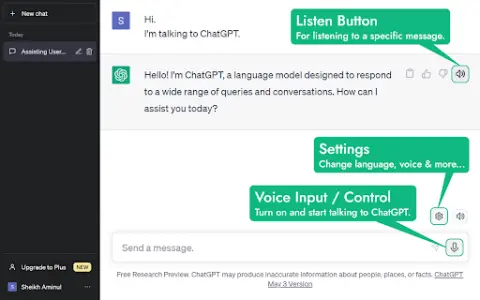
Install the extension, enable the microphone, and start speaking. Access settings via the ️ icon to customize voice control language, speech rate, voice commands, and keyboard shortcuts. Click the ️ icon or press the spacebar to activate voice control. Click the icon to listen to messages or toggle read-aloud.
Core features of the ChatGPT Voice Control Extension AI Chrome extension/plugin
Multilingual voice control and input
Text-to-speech functionality for AI responses
Customizable voice and language settings
Adjustable speech rate
Customizable message sending options
Automatic language detection for TTS
Read-aloud feature with sentence highlighting
Customizable keyboard shortcuts
Real-time voice conversation
Text-to-speech functionality for AI responses
Customizable voice and language settings
Adjustable speech rate
Customizable message sending options
Automatic language detection for TTS
Read-aloud feature with sentence highlighting
Customizable keyboard shortcuts
Real-time voice conversation
Visits:13
Updated:2026-11-06
Related




1
 2
 3
 4
 5
 6
 7
 8
 9
 10
Docsumo
Docsumo 自动从非结构化文档中提取数据,准确率高且效率高。
Creators AI
一份提供 AI 见解、工具和指南的 Substack 通讯,专为创作者和企业家打造。
Eofis extension
Eofis是一个具有自动生成、协作和自动排程功能的学习平台。
WorkWeave
增强工程团队性能的 AI 平台,提供个性化见解。
Internet.io
一个将顶级AI引擎整合为可靠洞察和自定义代理创建的平台。
Speech to Text
Chrome扩展,通过语音或文本创建可自定义背景和字体的笔记。
HelloRecap
基于人工智能的应用程序,将音频录音转录和总结为可操作的见解。
Free AI PNG Generator
免费AI PNG生成器,用于即时创建高质量的PNG图像。
VoiceInk
An open-source speech-to-text app for macOS that provides local AI to protect privacy and support offline use.
secretary
分析网站定价页面以获取关键信息。
1
 2
 3
 4
 5
 6
 7
 8
 9
 10

Zlibrary
Zlibrary is known as the world's largest digital library, containing 9,826,996 e-books and 84,837,646 journal articles. From various well-known literary works, science and engineering, humanities and arts, to academic papers, etc.! Support PDF, epu
LinkFox AI
为跨境电商提供的AI工具
HeyGen
AI数字人视频生成
堆友AI
堆友是Alibaba Design打造的设计师全成长周期服务平台,围绕品质、效率、技能、成就、收入五大用户价值布局平台能力,全力服务设计师,旨在成为设计师的好朋友。
堆友历经大厂设计师团队多轮打磨雕刻,集海量高品质3D素材、实时在线渲染、多元场景功能应用、轻便好学易上手等多重优势于一身的设计神器,更自带免费可商用属性,为专业设计师、运营工友、学生小白、社交达人提供了一个零成本的在线设计站点和资源库。
PixPix
AI电商套图与视频生成
OptimizerAI
AI音效生成器,基于文本或音频生成无限高质量声音。
Riffusion
生成式AI乐器,能够根据文本提示创建、重混和分享高品质歌曲。
StockTune
StockTune provides AI-generated royalty-free music for content creators to use without attribution.
PDF Converter
Free online tool for converting and editing PDF files.
高性价比人生指南HowToLiveBetter
手机里还有哪些会员在自动扣费?常用邮箱的密码,有没有和其他网站重复?租房合同里,押金到底什么时候退? 这些事单独拿出来,都不算复杂。但没人提醒的时候,很容易踩坑。今天分享一个 GitHub 60.5k
1
2
3
4
5
6
7
8
9
10
Zlibrary
Zlibrary is known as the world's largest digital library, containing 9,826,996 e-books and 84,837,646 journal articles. From various well-known literary works, science and engineering, humanities and arts, to academic papers, etc.! Support PDF, epu
LinkFox AI
为跨境电商提供的AI工具
HeyGen
AI数字人视频生成
堆友AI
堆友是Alibaba Design打造的设计师全成长周期服务平台,围绕品质、效率、技能、成就、收入五大用户价值布局平台能力,全力服务设计师,旨在成为设计师的好朋友。
堆友历经大厂设计师团队多轮打磨雕刻,集海量高品质3D素材、实时在线渲染、多元场景功能应用、轻便好学易上手等多重优势于一身的设计神器,更自带免费可商用属性,为专业设计师、运营工友、学生小白、社交达人提供了一个零成本的在线设计站点和资源库。
PixPix
AI电商套图与视频生成
OptimizerAI
AI音效生成器,基于文本或音频生成无限高质量声音。
Riffusion
生成式AI乐器,能够根据文本提示创建、重混和分享高品质歌曲。
StockTune
StockTune provides AI-generated royalty-free music for content creators to use without attribution.
PDF Converter
Free online tool for converting and editing PDF files.
高性价比人生指南HowToLiveBetter
手机里还有哪些会员在自动扣费?常用邮箱的密码,有没有和其他网站重复?租房合同里,押金到底什么时候退? 这些事单独拿出来,都不算复杂。但没人提醒的时候,很容易踩坑。今天分享一个 GitHub 60.5k